Email still pulls more weight than most channels, but only if you measure it right.
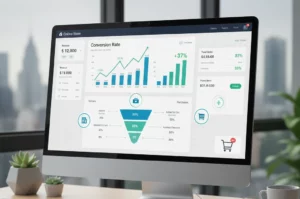
Opens and clicks may look good on a dashboard, but they don’t tell you whether your emails are actually delivering results. That’s where conversion rate comes in.
Knowing how to calculate conversion rate in email marketing helps you measure what truly matters: sign-ups, purchases, downloads, or any goal that moves your business forward.
Understanding your conversion rate also allows you to make smarter decisions. You can experiment with subject lines, calls to action, design, and personalization, then see exactly how each change impacts results.
Instead of guessing, you’ll know which emails turn interest into real engagement, and which ones are falling short.
In this blog, you’ll learn how to calculate conversion rate in email marketing, why that number matters, and how to use it to improve real revenue (not just opens or clicks).
What is Email Conversion Rate?
The percentage of delivered emails that result in a conversion (desired action).
For example, if 1,000 emails are delivered and 50 recipients make a purchase, the send-to-conversion rate is (50/1,000) × 100% = 5%.
Conversion Rate (per send) = (Total Conversions ÷ Emails Delivered) × 100%
How Email Conversion Rate Helps Businesses?
Your email conversion rate shows if your emails are actually working and helping your business grow. Here’s why it matters:
- Tracks Real Performance: When your conversion rate goes up, it means people are taking action. If it goes down, it’s a clear sign something needs fixing—like your message, timing, or audience.
- Improves Targeting: By analyzing conversions across different groups, you can identify which subscribers respond best and focus on those high-value audiences.
- Guides Better Content: Low conversion rates highlight weak subject lines, calls to action, or offers. This helps you quickly improve what’s not working.
- Supports Smart Testing: A/B testing is more useful when you measure conversions, not just opens or clicks.
- Shows Real ROI: Conversion rate connects your emails directly to sales, helping you prove the value of your email marketing spend.
That said, conversion rate turns email results into clear business insights you can act on.
Conversion Rate vs. CTR vs. CTOR
These three metrics measure different steps of how people interact with your emails.
Knowing what each one means helps you quickly spot where a campaign is doing well, or where it’s falling short.
| Metric | What it measures | Formula | What it shows |
| Conversion rate | People who completed your main goal | (Conversions ÷ Delivered emails) × 100 | How effective your campaign is |
| CTR (Click-Through Rate) | People who clicked a link in your email | (Clicks ÷ Delivered emails) × 100 | Overall engagement with your email |
| CTOR (Click-to-Open Rate) | People who clicked after opening the email | (Clicks ÷ Opens) × 100 | How relevant and appealing your content is |
How to read the results:
- High CTR but low conversion: Your email gets clicks, but your landing page or offer needs improvement.
- Low CTOR: People open the email, but the content or call to action isn’t strong enough.
Together, these metrics help you understand exactly where to optimize your email campaigns.
How to Choose the Right Conversion Metric?
To get useful insights from email campaigns, marketers should match the conversion metric to the campaign’s goal.
- For acquisition goals (like new signups or purchases), track send-to-conversion. This shows how many people completed the goal after receiving the email.
- For engagement-focused emails (such as content or lead-generation emails), open-to-conversion or click-to-conversion metrics are more helpful. These show how well your message motivates action after interest is shown.
Moreover, make tracking clear and reliable. Use UTM tags on email links so your analytics tools can correctly connect visits and conversions to each specific email campaign.
What is the Average Email Conversion Rate by Industry?
Conversion-rate benchmarks vary widely because different studies measure different goals (purchase vs. signups vs. form fills), different email types (campaigns vs. automations), and different data sets. Below is a short, easy guide you can use.
| Industry | Typical campaign conversion (rule of thumb) | Note/source |
| Clothing & Accessories (ecommerce) | 0.05% – 0.2% | Campaign purchase conversion can be very small. |
| Food & Beverage / Restaurants | 0.1% – 0.3% | Some verticals see higher purchase rates per campaign. |
| Health & Beauty | 0.08% – 0.2% | Depends on the promotion type and the list quality. |
| B2C (general) | 1.5% – 3% | When measuring broad goals, it is not just campaign purchases. |
| B2B (general) | 1% – 2.5% | B2B conversions often involve forms or demos rather than instant purchases. |
| Benchmarks vary widely | 0.04% → 15%+ | Different studies use different definitions; compare apples to apples. |
So, why do the numbers look so different? Here’s why:
- Different goals: A click-to-signup goal will yield higher conversion rates than a click-to-purchase goal.
- Campaign vs. automation: Welcome or cart-abandonment automations usually convert far better than one-off blast campaigns.
- List quality & offer: Warm, segmented lists + a strong offer = much higher conversion.
- How are conversions counted? Are conversions tracked as last-click, multi-touch, or attributed differently? That changes the rate.
Benchmarks are useful, but only if you match definitions. For campaign purchases, expect very small percentages; for broader goals,s expect low single-digit percentages. Always compare the same type of email and the same conversion goal when using these numbers.
Data Collection & Tracking Methods
To accurately measure email conversions, you need clear tracking and clean data.
Here’s how to set it up in a simple way:
-
Use Tracking Tags on Email Links
Every email link should include UTM parameters so analytics tools can identify the source of conversions.
A basic email UTM setup looks like this:
- utm_source=newsletter
- utm_medium=email
- utm_campaign=spring_sale
These tags allow tools like Google Analytics to attribute visits and goal completions to a specific email campaign.
In GA4, you can mark actions such as a “Thank You” page view, form submission, or purchase as a conversion event.
-
Enable ESP Built-In Tracking
Most email service providers (ESPs) include built-in tracking features. Platforms like Mailchimp and HubSpot can automatically track:
- Email opens (using invisible tracking pixels)
- Link clicks
- Basic conversion activity
Make sure tracking is enabled and that your website pages (forms, checkout, thank-you pages) have the required tracking scripts installed.
-
Connect Email to Your CRM
For deeper insight, connect your ESP to a CRM system such as Salesforce or HubSpot.
This allows:
- Email-driven leads or purchases to become contact records
- Lead scoring based on email clicks and conversions
- Accurate reporting for long or multi-step sales cycles
CRM integration is especially important for B2B funnels and high-value purchases.
-
Understand Attribution (and Its Limits)
Most email marketing tools use last-click attribution, which means the email may not get credit if a user clicks another channel before converting.
To get a clearer picture:
- Review assisted conversions
- Use multi-touch attribution if available
This helps you understand email’s influence across the full customer journey.
-
Avoid Common Tracking Issues
Watch out for these common mistakes:
- Missing UTMs: Untagged links may show as “direct” or “none” traffic
- Broken tracking scripts: Conversions won’t fire if scripts aren’t installed correctly
- Inconsistent naming: Makes reporting and comparisons harder
For reliable email conversion tracking, you need consistent UTM parameters, enabled ESP tracking, CRM integration, and a realistic view of attribution.
Get these right, and your email performance data becomes far more trustworthy and actionable.
How Can You Run Statistically Valid A/B Tests for Email Campaigns?
To make confident decisions from email tests, you need enough data and a clear testing process.
Here’s how to approach it:
-
Sample Size & Statistical Significance
Email conversions are yes-or-no actions (converted or not), so results must be tested statistically.
- If your normal conversion rate is low (around 1–3%), you’ll need thousands of recipients per version to detect meaningful improvements.
- For example, spotting a 20% lift at 95% confidence usually requires a large sample.
- Use A/B sample-size calculators from tools like Optimizely to plan before you send.
- It is recommended to wait until results reach statistical significance before choosing a winner.
To add clarity, calculate confidence intervals for your conversion rates. For example:
- A 1% conversion rate from 5,000 emails has a margin of error of about ±0.28%.
- Jumping from 1% to 2% is likely meaningful.
- Small changes may be due to chance.
-
A/B Testing Best Practices
To get clean, reliable results:
- Test one variable at a time (subject line, CTA, layout, or offer).
- Split your list randomly so both groups are similar.
- Let tests run long enough to reach your significance threshold (usually p < 0.05).
- Avoid stopping tests early, even if one version looks better at first.
It is recommended to run A/B tests regularly and use automated time frames when possible to avoid bias.
-
Statistical Pitfalls to Avoid
Common mistakes that weaken results include:
- Too small a sample size, which leads to unclear or false results
- Running multiple tests at once, increasing false positives
- Changing elements mid-test breaks the validity
- Relying on intuition instead of data
Also, remember timing effects: your most engaged subscribers often open and convert first. This can skew early results if you don’t let the test run to completion.
Therefore, plan your tests, define success criteria clearly, use sufficient data, and let tests run to completion. Strong A/B testing replaces guesswork with confidence and leads to better-performing email campaigns over time.
Key Tactics to Improve Conversion Rate
Improving email conversions means optimizing every step of the funnel.
Focus on the tactics below, ranked by impact:
- Personalization & Segmentation (Highest impact): Segmented campaigns can be up to 6× more likely to convert. Use data like past purchases, location, or engagement to tailor offers, copy, and CTAs (e.g., abandoned-cart follow-ups or personalized offers).
- Strong Subject Lines & Preview Text: Your subject line drives opens. Benefit-driven, personalized, or urgent subject lines can lift open rates by 20–30%. Preview text should support, not repeat, the subject.
- Clear, First-Person CTAs: Use simple, personal CTAs like “Get my discount” or “Start my free trial.” Highlight one main CTA early and link to a fast, relevant landing page.
- Mobile-Friendly Design: With over half of emails opened on mobile, use responsive layouts, short copy, and large buttons. Poor mobile experience is a common conversion killer.
- A/B Testing & Continuous Optimization: Test one change at a time (subject line, CTA, timing). Even 5–10% gains per test add up over time.
- Automated Journeys & Triggers: Welcome series, cart abandonment, and post-purchase emails often convert 8–9× better than one-off campaigns. Use timed follow-ups to nurture action.
- Social Proof & Incentives: Reviews, popularity cues, limited-time discounts, or guarantees increase urgency and trust. Test to find what works best.
- List Hygiene & Timing: Remove inactive subscribers and optimize send times. A smaller, engaged list converts better than a large, unresponsive one.
Final Thoughts
Understanding how to calculate conversion rates in email marketing is essential, but the real value lies in how you use that insight.
Conversion rate shows whether your emails are driving real action, not just opens or clicks. When tracked correctly, it helps you see what’s working, what’s not, and where to optimize.
By aligning the right conversion metric with each campaign goal, using proper tracking, and testing changes with statistical confidence, you turn email marketing into a measurable growth channel.
Thus, small improvements, better subject lines, clearer CTAs, and smarter segmentation can compound into meaningful gains over time.
Most importantly, always view conversion rate as part of a bigger picture. Combine it with opens, clicks, and engagement trends to understand the full customer journey.
When you consistently measure, test, and refine, email becomes one of the most reliable and profitable channels in your marketing mix.